
PHP - グラフを作ろう! (gnuplot編)
PHP のライブラリ(クラス)には、gd というグラフィックモジュールを利用しグラフの作成できるものがあります。しかし、ライセンス上ある用途で利用できないものやあまり高機能でないものなど、制限があり利用しにくい場合があります。そこで、UNIX では古くからグラフを作成するツールとして使われてきた Gnuplot を PHP と組み合わせてみましょう。
Gnuplot の導入
Gnuplot は、名前から判断される GNU のプロジェクトではありません。Thomas Williams氏、Colin Kelley氏らによって 1986年に UNIX でグラフを出力するツールとしてデビューしたものです。
簡単に、Gnuplot のインストール方法を説明しましょう。必要なパッケージを入手しインストールします。多くの画像フォーマットに対応するために GD, PNG, JPEG といったライブラリーをインストールしておくと便利です。
| Gnuplot | Gnuplot 本体。Gnuplot の不具合等により PHP で利用するには 4.0 以降のバージョンのものを推奨します。 | http://www.gnuplot.info/ |
| GD Graphics Library | Thomas Boutell氏の作成した、線や多角形、円を描画するためのライブラリ | http://www.boutell.com/gd/ |
| FreeType | TrueTypeフォントをレンダリングするライブラリ | http://www.freetype.org/ |
| PNG graphics library | PNG グラフィックスフォーマット用のライブラリ | http://www.libpng.org/pub/png |
| JPEG library | JPEG グラフィックスフォーマット用のライブラリ | ftp://ftp.uu.net/graphics/jpeg/ |
ライブラリインストール手順 (スーパーユーザーで作業)
# gzip -dc libpng-1.2.7.tar.gz | tar xf -
# cd libpng-1.2.7
# cp scripts/makefile.OS Makefile
    (OS は、インストールする OS のタイプを指定:linux, solaris ...)
# make
# make install

# gzip -dc jpegsrc.v6b.tar.gz | tar xf -
# cd jpeg-6b
# ./configure --enable-static
    (ダイナミックライブラリを作りたければコマンドラインオプション --enable-shared を指定)
# make
# make install

# gzip -dc freetype-2.1.9.tar.gz | tar xf -
# cd freetype-2.1.9
# ./configure --enable-static
# make
# make install

# gzip -dc gd-2.0.28.tar.gz | tar xf -
# cd gd-2.0.28
# ./configure --without-libiconv-prefix
    (iconv を指定したければコマンドラインオプション --with-libiconv-prefix=PATH を指定)
    (png, jpeg, freetype をきちんと指定したければコマンドラインオプション --with-????=PATH を指定)
  ...
  ** Configuration summary for gd 2.0.28:

     Support for PNG library:          yes
     Support for JPEG library:         yes
     Support for Freetype 2.x library: yes
     Support for Xpm library:          yes
     Support for pthreads:             yes
  ...
# make
# make install
Gnuplot のインストール
上記では、GD, JPEG, PNG といった画像フォーマットを有効にするために各ライブラリーをインストールしました。このほかにも、PDF や suntools など必要に応じてインストールすると、扱える画像の種類を増やすことが出来ます。
# gzip -dc gnuplot-4.0.0.tar.gz | tar xf -
# cd gnuplot-4.0.0
# ./configure --with-png=/usr/local --with-gd=/usr/local
  ...
  Use builtin minimal readline
  Enable generation of JPEG files
  Enable generation of GIF files
  Enable generation of PNG files
    using gd driver
  ...
# make
# make install
起動を確認!
# gnuplot

      G N U P L O T
      Version 4.0 patchlevel 0
      last modified Thu Apr 15 14:44:22 CEST 2004
      System: Darwin 7.5.0

      Copyright (C) 1986 - 1993, 1998, 2004
  ...
Terminal type set to 'unknown'
gnuplot> q
#
PHP での利用が目的なので、詳細な使い方は gnuplot のサイトを参照してください。
Gnuplut を PHP で利用する
Gnuplot を PHP で利用する方法を簡単に説明すると、Gnuplot が標準入力から受け付けたコマンドに対して標準出力にグラフ画像を出力する仕組みを利用します。 このことで、動的に集計したデータをそのままグラフ化することができます。
集計したデータが配列に入っており、proc_open関数を利用して Gnuplot にデータを渡しグラフを出力します。
プロットするデータを作成
データが無い場合
"NaN"とするX軸, Y軸のラベルを作成
proc_open関数で gnuplit を起動標準入力となるパイプに、gnuplot のコマンドを入力(グラフの初期設定)
標準入力となるパイプに、gnuplot のコマンドを入力(データ)
header関数で画像のMIMEタイプをセット標準出力となるパイプから gnuplot の出力を
fpassthru関数で出力
この流れをコードにすると以下のようになります(実際には、クラス化すると見やすく使いやすいモジュールになるでしょう)。
<img src="graph.php" alt="graph"> のように <img> タグにプログラムを記述する場合、エラーの際はメッセージを出力して終了するのではなくエラー画像ファイルを用意しておき readfile, fpassthru 関数で出力するとよいでしょう。
<?php
define('GPLOT', '/usr/local/bin/gnuplot');

// データをもとにグラフ用の配列を作成
$xlabel = array(
  "H16.1", "H16.2", "H16.3", "H16.4", "H16.5", "H16.6",
  "H16.7", "H16.8", "H16.9", "H16.10", "H16.11", "H16.12"
);

$datas = array(
  array("3500", "3400", "3250", "3000", "3400", "3850", "3600", "3700", "3950", "3900", "4250", "4000"),
  array("3100", "3050", "2900", "2750", "3100", "3300", "3150", "3100", "3300", "3050", "2950", "3100"),
  array("4600", "3250", "4200", "4150", "4650", "3200", "4200", "4600", "4850", "4100", "NaN", "4850")
);

// Y軸のラベルを決定するためにデータの最大と最小を得る
$aryData = array();
foreach ($datas as $data) {
  $aryData = array_merge($aryData, $data);
}
$aryData = array_unique($aryData);
sort($aryData);
$cnt = count($aryData);
if ($cnt <= 2) {
  print "ERROR: no graph data\n";
  exit(1);
}
if ($aryData[$cnt-1] == "NaN") {
  array_pop($aryData);
}
$cnt = count($aryData);
if ($cnt <= 1) {
  print "ERROR: no graph data\n";
  exit(1);
}
$min_num = $aryData[0];
$max_num = $aryData[$cnt-1];
$balance = $max_num - $min_num;
if ($balance > 5000) {
  $y_scale = 1000;
} elseif ($balance > 1000) {
  $y_scale = 500;
} elseif ($balance > 500) {
  $y_scale = 100;
} elseif ($balance > 100) {
  $y_scale = 50;
} elseif ($balance > 50) {
  $y_scale = 10;
} else {
  $y_scale = 5;
}

// Y軸のラベル最小
$near_min = floor($min_num / $y_scale) * $y_scale;
if ($near_min == $min_num) {
  if ($near_min > 0) {
    $near_min -= $y_scale;
  }
}

// Y軸のラベル最大
$near_max = floor($max_num / $y_scale) * $y_scale + $y_scale;

// gnuplot の初期化
$dspec = array(
  0 => array("pipe", "r"), // stdin
  1 => array("pipe", "w"), // stdout
  2 => array("pipe", "w") // stderr
);

// Gnuplot の起動
// $pipes[0] - gnuplot へコマンドの送信
// $pipes[1] - gnuplot から画像の出力
// $pipes[2] - gnuplot からの標準エラー出力
$gnuplot = proc_open(GPLOT, $dspec, $pipes);
if ( ! is_resource($gnuplot) ) {
  print "proc_open error\n";
  exit(1);
}

// 初期設定
fwrite($pipes[0], "set term png\n");
fwrite($pipes[0], "set grid\n");
fwrite($pipes[0], "set border\n");
fwrite($pipes[0], "set nokey\n");
fwrite($pipes[0], "set offsets 0.5, 0.5, 0, 0\n");
fwrite($pipes[0], "set size 1, 0.8\n");
fwrite($pipes[0], "set missing 'NaN'\n");
header("Content-type: image/png");

// X軸のラベル(年.月)
fwrite($pipes[0], "set xtics (");
$last=count($xlabel);
$label_num=0;

foreach ($xlabel as $date) {
  $label_num++;
  $label = sprintf("'%s' %d", $date, $label_num);
  if ($label_num != $last) {
    $label .= ", ";
  }
  fwrite($pipes[0], $label);
}
fwrite($pipes[0], ")\n");

// Y軸のラベル(単位)
fwrite($pipes[0], "set ytics (");

for ($unit=$near_min; $unit<=$near_max; $unit+=$y_scale) {
  $label = sprintf("'%s' %d", number_format($unit), $unit);
  if ($unit != $near_max) {
    $label .= ", ";
  }
  fwrite($pipes[0], $label);
}
fwrite($pipes[0], ")\n");

// データの表示

// グラフの種類
fwrite($pipes[0], "plot ");
$ratio = sprintf("[1:%d] [%d:%d] ", $last, $near_min, $near_max);
fwrite($pipes[0], $ratio);
$data_num = count($datas);

foreach ($datas as $data) {
  fwrite($pipes[0], "'-' with linesp lt ");
  fwrite($pipes[0], $data_num);
  fwrite($pipes[0], " lw 1 pt 13 ps 1");
  if ($data_num > 1) {
    fwrite($pipes[0], ", ");
  }
  $data_num--;
}
fwrite($pipes[0], "\n");

// データ
foreach ($datas as $data_list) {
  $label_num=0;

  foreach ($data_list as $data) {
    $label_num++;
    $data_point = sprintf("%d %s\n", $label_num, $data);
    fwrite($pipes[0], $data_point);
  }
  fwrite($pipes[0], "e\n");
}
fclose($pipes[0]);

// グラフ出力
fpassthru($pipes[1]);
fclose($pipes[1]);

// エラー出力
if (!empty($pipes[2])) {
  error_log($pipes[2], 0);
}
fclose($pipes[2]);

// 終わり
proc_close($gnuplot);

?>
このプログラムを graph.php として Web サーバーのDocumentRoot下に置き、ブラウザーから実行すると折線グラフが表示されます。
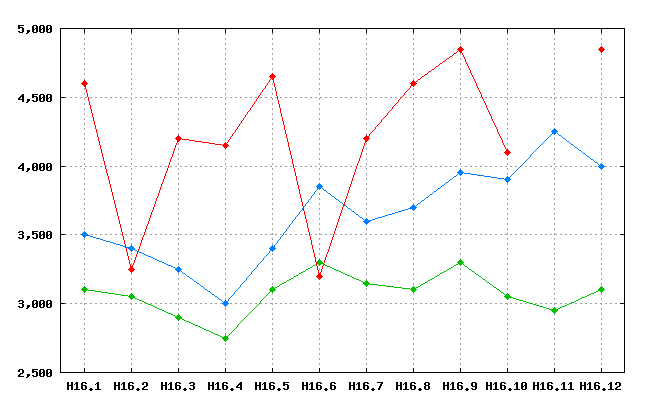
上記のプログラムをクラスで表現しようかなと思ったのですが、それは時間ができたらこのページを更新してみます。