Windows版 PHP環境でグラフを作ろう!(JpGraph)
PHPの状態と GD モジュール
Windows には、PHPが C:\php にインストールされているものとします。PHP で、グラフを作成するのに GD モジュールが必要になり、日本語を扱うのに mbstring モジュールも必要になります。そこで、下記のように php.ini の extension を有効にします。 ここではmbstring の設定を、内部コード/出力コードともに UTF-8に設定していますが利用しやすい漢字コードに設定するとよいでしょう。
include_path="c:/php/PEAR;c:/php/includes"
...
extension_dir = "c:/php/extensions"
...
extension=php_gd2.dll
extension=php_mbstring.dll
...
[mbstring]
; language for internal character representation.
mbstring.language = Japanese
mbstring.internal_encoding = UTF8
mbstring.http_input = auto
mbstring.http_output = UTF8
mbstring.encoding_translation = Off
mbstring.detect_order = auto
mbstring.substitute_character = none
mbstring.func_overload = 0
Windows版 Apache に PHP を導入する場合、 PHPを解凍した際に展開される php4ts.dll を c:\winnt\system32 (c:\windows\system32)にコピーします。また、php.ini-dist を利用して php.ini を作成します。apache の設定は、apache.conf に以下の記述を追加します。(PHPを c:\php に解凍したと想定しています)
LoadModule php4_module c:/php/sapi/php4apache.dll
AddModule mod_php4.c

AddType application/x-httpd-php .php
AddType application/x-httpd-php-source .phps
JpGraph クラス・ライブラリ
PHPでグラフを作成するには、JpGraph というライブラリを利用すると便利です。しかし、商用利用ではライセンスを購入する必要があります。必要なモジュールをダウンロードしてインストールします。Solaris 10 や PHP5 で使用したいなら「Solaris 10 に PHP5 と MySQL5 をインストール」 を参照してください。
| JpGraph | http://www.aditus.nu/jpgraph/ |
JpGraph のライブラリは、どこに置いても構いませんが PHP がサーチできるパス (include_path)に置くか、インストールしたディレクトリを php.ini の include_path に追加すると良いでしょう。 ここでは、include_path = "c:/php/PEAR;c:/php/includes" となっているとして、c:\php\includes\JpGraph にライブラリをインストール(コピー)します。
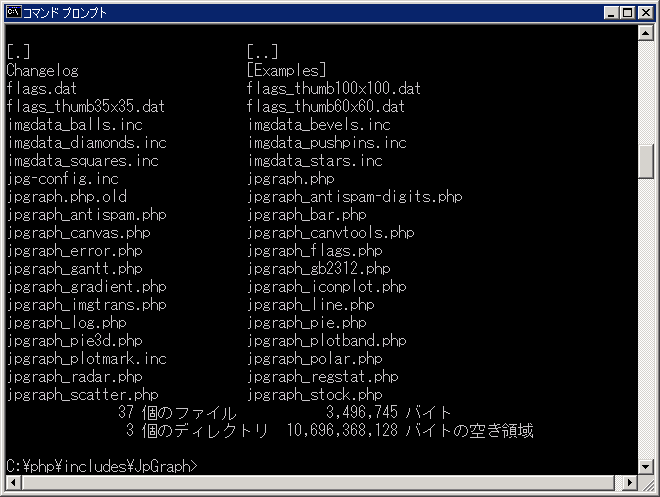
JpGraph 1.17 から日本語フォントを扱い易いように作られているため、設定ファイルである jpg-config.inc 内の TrueType フォントのディレクトリやゴシック、明朝のフォントを指定する部分を修正します。ここでは、「MS 明朝」「MS ゴシック」を指定しています。
42行目
DEFINE("TTF_DIR",    "c:/winnt/fonts/");    // for Windows 2000, Windows XP -> c:/windows/fonts/
DEFINE("MBTTF_DIR",  "c:/winnt/fonts/");    // for Windows 2000, Windows XP -> c:/windows/fonts/
...
76行目
// Japanese TrueType font used with FF_MINCHO, FF_PMINCHO, FF_GOTHIC, FF_PGOTHIC
DEFINE('MINCHO_TTF_FONT',  'MSMINCHO.TTC');
DEFINE('PMINCHO_TTF_FONT', 'MSMINCHO.TTC');
DEFINE('GOTHIC_TTF_FONT',  'MSGOTHIC.TTC');
DEFINE('PGOTHIC_TTF_FONT', 'MSGOTHIC.TTC');
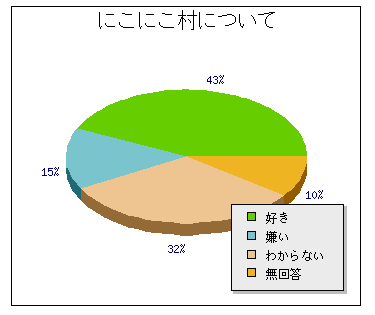
簡単な円グラフを作ってみましょう。以下のプログラムを適当なファイル名で Web サーバーの DocumentRoot下に置き、ブラウザーから実行すると円グラフが表示されます。charset に SHIFT_JIS ではなく sjis-win を指定しています。以下のサンプルが Shift-JISで書かれているとして mb_convert_encoding を利用して UTF-8 にしています。サンプルが EUC で書かれていれば eucjp-win を UTF-8 にするようにし、UTF-8 で書かれていれば変換の必要はありません。
<?php
// 使用するグラフを読み込む
require_once("JpGraph/jpgraph.php");
require_once("JpGraph/jpgraph_pie.php");
require_once("JpGraph/jpgraph_pie3d.php");

// データの設定
$data_yes     = mb_convert_encoding("好き", "UTF-8", "sjis-win");
$data_no      = mb_convert_encoding("嫌い", "UTF-8", "sjis-win");
$data_unkown  = mb_convert_encoding("わからない", "UTF-8", "sjis-win");
$data_none    = mb_convert_encoding("無回答", "UTF-8", "sjis-win");
$data_legends = array($data_yes, $data_no, $data_unkown, $data_none);
$data         = array(       43,       15,           32,         10);

// グラフオブジェクトの生成
$graph = new PieGraph(350,300,"auto");

$title = mb_convert_encoding("にこにこ村について","UTF-8","sjis-win");
$graph->title->Set($title);
$graph->title->SetFont(FF_GOTHIC, FS_NORMAL, 16);
$graph->legend->Pos(0.05, 0.95, "right", "bottom");
$graph->legend->SetFont(FF_GOTHIC, FS_NORMAL);

$pie = new PiePlot3D($data);
$pie->SetSize(0.4);
$pie->SetCenter(0.5,0.5);
$pie->SetLegends($data_legends);

$graph->Add($pie);

// イメージフォーマット
$graph->img->SetImgFormat('gif');

// グラフの表示
$graph->Stroke();
?>
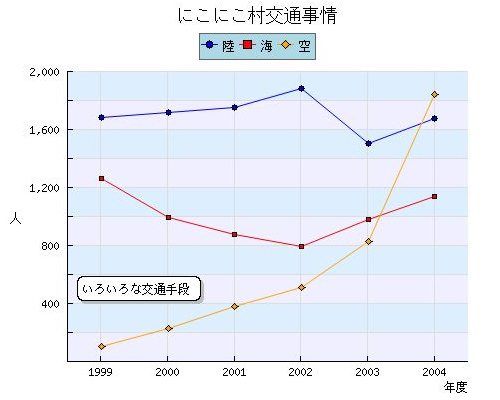
今度は、折線グラフを作ってみましょう。以下のプログラムを適当なファイル名で Web サーバーのDocumentRoot下に置き、ブラウザーから実行すると折線グラフが表示されます。ギリシャ文字などをきちんと扱えるように、charset に SHIFT_JIS ではなく sjis-win を指定しています。
<?php
// 使用するグラフ
require_once("JpGraph/jpgraph.php");
require_once("JpGraph/jpgraph_line.php");
require_once("JpGraph/jpgraph_canvas.php");

// データ
$labelx = array("1999", "2000", "2001", "2002", "2003", "2004");
$data1  = array(  1683,   1719,   1754,   1883,   1502,   1677);
$data2  = array(  1261,    996,    875,    794,    982,   1140);
$data3  = array(   101,    230,    380,    513,    827,   1843);

// Y軸用のコールバック関数
function yScaleCallback($aVal) {
    return number_format($aVal);
}

// グラフオブジェクトの生成
$graph = new Graph(500,400,"auto");

// 画像フォーマット
$graph->img->SetImgFormat("jpeg");
$graph->img->SetQuality(80);
// マージン left, right, top, bottom
$graph->img->SetMargin(60,40,70,40);
$graph->img->SetAntiAliasing();
$graph->SetScale("textint");
$graph->SetFrame(false);
$graph->SetColor('lightblue');

// タイトル
$title = mb_convert_encoding("にこにこ村交通事情","UTF-8","sjis-win");
$graph->title->Set($title);
$graph->title->SetFont(FF_GOTHIC, FS_NORMAL, 14);

// X,Y軸
$graph->xaxis->SetTickLabels($labelx);
$graph->yaxis->SetLabelFormatCallback('yScaleCallback');
$graph->yaxis->SetTextLabelInterval(2);
$graph->yaxis->HideZeroLabel();
$graph->yaxis->SetTitleMargin(55);
$titley = mb_convert_encoding("人","UTF-8","sjis-win");
$graph->yaxis->title->Set($titley);
$graph->yaxis->title->SetFont(FF_GOTHIC, FS_NORMAL);
$titlex = mb_convert_encoding("年度","UTF-8","sjis-win");
$graph->xaxis->title->Set($titlex);
$graph->xaxis->title->SetFont(FF_GOTHIC, FS_NORMAL);

// グリッド
$graph->xgrid->Show(true,false);
$graph->ygrid->SetFill(true,'#EFEFFF@0.5','#DDEEFF@0.5');

// 凡例
$graph->legend->Pos(0.5, 0.08, "center", "top");
$graph->legend->SetLayout(LEGEND_HOR);
$graph->legend->SetFont(FF_GOTHIC, FS_NORMAL);
$graph->legend->SetShadow(false);
$graph->legend->SetLineWeight(1);
$graph->legend->SetColor('black','darkgray');
$graph->legend->SetFillColor('lightblue');

// 陸の交通手段
$legend1 = mb_convert_encoding("陸","UTF-8","sjis-win");
$p1 = new LinePlot($data1);
$p1->mark->SetType(MARK_FILLEDCIRCLE);
$p1->mark->SetFillColor("blue");
$p1->mark->SetWidth(3);
$p1->SetColor("blue");
$p1->SetCenter();
$p1->SetLegend($legend1);
$graph->Add($p1);

// 海の交通手段
$legend2 = mb_convert_encoding("海","UTF-8","sjis-win");
$p2 = new LinePlot($data2);
$p2->mark->SetType(MARK_SQUARE);
$p2->mark->SetFillColor("red");
$p2->mark->SetWidth(4);
$p2->SetColor("red");
$p2->SetCenter();
$p2->SetLegend($legend2);
$graph->Add($p2);

// 空の交通手段
$legend3 = mb_convert_encoding("空","UTF-8","sjis-win");
$p3 = new LinePlot($data3);
$p3->mark->SetType(MARK_DIAMOND);
$p3->mark->SetFillColor("orange");
$p3->mark->SetWidth(6);
$p3->SetColor("orange");
$p3->SetCenter();
$p3->SetLegend($legend3);
$graph->Add($p3);

// コメント
$message = mb_convert_encoding("いろいろな交通手段","UTF-8","sjis-win");
$t1 = new Text($message);
$t1->Pos(0.15,0.7);
$t1->SetOrientation("h");
$t1->SetFont(FF_GOTHIC, FS_NORMAL);
$t1->SetBox("white","black",'gray');
$t1->SetColor("black");
$graph->AddText($t1);

// グラフの描画
$graph->Stroke();

?>